
You bought an ergonomic mouse to fix your wrist pain. Three weeks later, nothing's changed or it's worse. The problem isn't the ergonomic mouse itself; rather, it's buying a vertical mouse for tendonitis, or a lightweight mouse for carpal tunnel. Same pain, completely different injuries, and the wrong mouse makes everything worse. Here's how to actually match the solution to your problem.
Symptoms of Carpal Tunnel and Tendonitis
The distinction comes down to what's being damaged. Carpal tunnel syndrome (CTS) occurs when the median nerve, a major nerve running through your wrist, gets squeezed inside the narrow carpal tunnel. Tendonitis is inflammation of the tendons (rope-like tissues connecting muscle to bone) from repetitive motion.
Here's how to identify which condition matches your symptoms:
| Feature | Carpal Tunnel Syndrome | Tendonitis |
| What's Affected | Median nerve compression | Tendon inflammation |
| Pain Location | Thumb, index, middle fingers | Wrist, thumb base, forearm |
| Numbness/Tingling | Yes, especially at night | Rarely |
| Worse During | Night/morning | Active movement |
| Pain Pattern | Electric, shooting | Dull ache, sharp with movement |
| Grip Strength | Drops objects unexpectedly | Pain when gripping hard |
The nighttime symptom is particularly telling: CTS often wakes people up with hand numbness because we unconsciously bend our wrists while sleeping.
Two Quick At-Home Tests
- Phalen's Test (for CTS): Press the backs of your hands together in front of your chest, fingers pointing down, for 60 seconds. Numbness or tingling in your thumb, index, or middle fingers suggests possible carpal tunnel syndrome.
- Finkelstein Test (for tendonitis): Make a fist with your thumb tucked inside. Gently bend your wrist toward your pinky side. Sharp pain along your thumb side indicates possible De Quervain's tenosynovitis (inflammation of thumb tendons).
If either test reproduces your symptoms, it provides a strong clue. However, for a definitive diagnosis and if symptoms persist beyond two weeks, consultation with a healthcare provider is necessary.

Why Your Mouse Causes Wrist Pain
Standard flat mice force your hand into positions that stress different structures during 8+ hour workdays. The damage happens gradually but predictably.
Flat Mice & Carpal Tunnel: The Pronation Problem
Traditional flat mice require full pronation—rotating your forearm so your palm faces completely downward. That rotation narrows the carpal tunnel space by up to 20%, creating a vise-like grip on your median nerve.
The compression intensifies when you add downward pressure during clicking. Users who develop CTS from mouse use typically spend 4+ hours daily in this pronated position, often with their wrist cocked upward while reaching for the top of the mouse, which leads a double compression.
Repetitive Clicking & Tendonitis: The Overuse Problem
A typical office worker performs 5,000-10,000 mouse clicks daily. Those tendons aren't built for that repetition without rest. The tendons develop micro-tears faster than your body can repair them, leading to chronic inflammation.
Heavy mice worsen the problem, as every movement requires more tendon force to overcome the weight's inertia.
Best Mice for Carpal Tunnel & Tendonitis Relief
Choosing the right ergonomic mouse means matching the design to your specific condition's mechanical cause.
Vertical Mice for Carpal Tunnel
Vertical mice rotate your hand 60-90 degrees toward a "handshake" position, opening the carpal tunnel space. This design reduces median nerve pressure by up to 32% compared to flat mice.
The key feature is the elevated thumb rest that prevents your hand from collapsing back into pronation. Look for designs where your thumb sits naturally above your index finger when gripping. Most users report reduced nighttime tingling within two weeks.
Ergonomic Mice for Tendonitis & Wrist Pain
For tendonitis, priority shifts to reducing repetitive strain:
- Trackball mice eliminate forearm sweeping motion—your thumb or fingers roll the ball while your wrist stays stationary, cutting tendon activity by 60%
- Contoured mice with shallow button angles require less finger extension per click
- Lightweight designs (under 100g) reduce force needed for each movement
What to Look for When Choosing a Mouse
These specifications determine real-world relief:
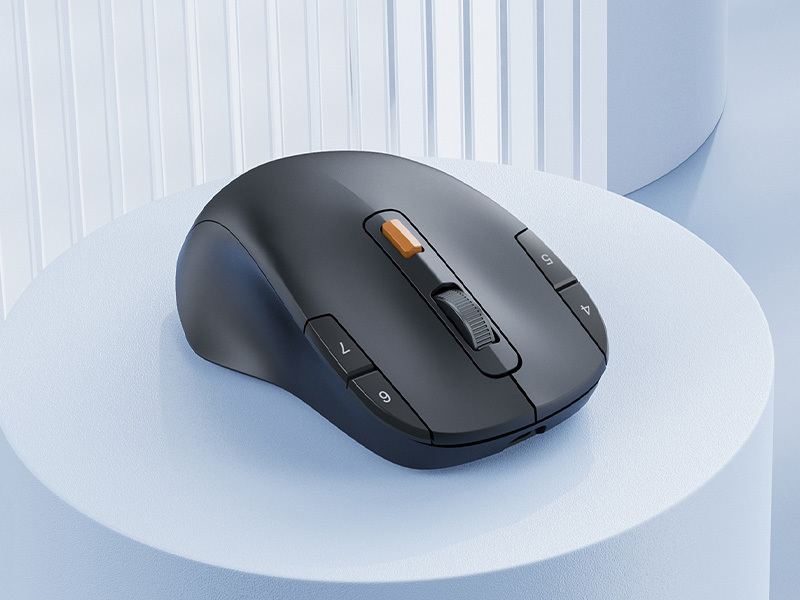
- Adjustable sensitivity: Higher sensitivity settings (measured as DPI, which stands for dots per inch) let your cursor travel farther across the screen with smaller hand movements, reducing tendon workload. Look for mice with 1600-3200 DPI options.
- Weight: Under 90g for standard mice, under 120g for vertical designs
- Wireless connectivity: Eliminates cable drag resistance
- Programmable buttons: Reduces index finger click volume by 30-40%
The "best" mouse addresses your specific injury: vertical for nerve compression, low-resistance for tendon inflammation.
5 Relief Tips & When to See a Doctor
Immediate interventions can halt symptom progression while your ergonomic mouse arrives.
1. Do strategic stretches every 30 minutes
Stretch your arm forward, with your hand down, and use your other hand to stretch your fingers back for 10 seconds, then stretch them down. This will stretch your ligaments, effectively opening your carpal tunnel. There’s a twist, though: frequency beats rarity.
2. Use Ice and Heat Correctly
Apply ice to reduce inflammation in the tendons after activity (15 minutes on, 45 minutes off). Heat, in contrast, can help relieve nerve-related muscle tension and morning stiffness. Avoid icing chronically tight muscles, and do not apply heat to an acutely inflamed area.
3. Optimize Your Entire Desk Setup
Keep your keyboards flat (with legs down) so that your wrists remain in a neutral, not bent, position. Place your computer monitor at eye level, helping you avoid slouching your shoulders, which transmit tension to your forearms. Keep your elbows positioned on your armrests with a 90-degree angle.
4. Take Micro-Breaks Every Hour
Shake your hands out. Make circles with your wrists. Stand up, changing your position completely. These moments of pause, lasting only 30 seconds, allow your tissues time to rest and your blood to flow back into your nerves.
5. Know When Professional Help Becomes Necessary
Seek medical attention if you experience any of the following: persistent numbness lasting over an hour; difficulty with fine motor skills (e.g., buttoning shirts or holding cups); noticeable weakness or muscle wasting at the base of the thumb; or nocturnal symptoms that persist despite ergonomic adjustments. Also, if your symptoms demonstrate no improvement with changes in your office setup within 6-8 weeks, imaging studies will give your doctor concrete answers. About 80% of conservatively managed early-stage carpal tunnel syndrome responds well, but any delay may advance your symptoms into the realm of surgery.
FAQs
Q1. Can a person suffer from both Carpal Tunnel syndrome as well as Tendonitis?
Indeed, this is a frequent scenario with computer users. Similarly, risk factors affect both nerves and tendons. But usually, one condition will predominate. Numbness will indicate that the likely diagnosis is CTS, while pain with movement will indicate that the diagnosis is probably tendonitis.
Q2. How Long Does It Take For An Ergonomic Mouse To Relieve Wrist Pain?
Pain will be reduced in most users within 1-2 weeks. Recovery will depend on the intensity. Mild will take 4-6 weeks, but if chronic, then 3-6 months. The appropriate mouse can help prevent further irritation while your body undergoes its natural repair process.
Q3. Are Expensive Ergonomic Mice Worth It For Carpal Tunnel Prevention?
Price doesn't equal effectiveness. A vertical mouse priced at $40, with proper positioning, will beat a gaming mouse priced at $150 that lays flat. Focus on design features that target your specific risks: vertical position for cts, weightlessness for tendonitis.
Q4. Should I Use A Wrist Rest With My Ergonomic Mouse?
No. Wrist rests for mice compress the carpal tunnel from below. Keep your wrist in neutral "floating" position, moving from your elbow and shoulder. Keyboard wrist rests are acceptable during typing pauses only.
Choose the Right Mouse for Yourself
Carpal tunnel syndrome requires a mouse with angle change, while tendonitis requires one that decreases movement size. Perform the home trials, see which category your problem belongs to from the chart, and pick the mouse suitable for your injury. Addressing these issues early is crucial to prevent chronic problems.Match your ergonomic mouse to your real-world problem today!


