

















FAQ - EM03 NL
About EM03 NL Connection
How do I re-pair the mouse with the USB receiver?
- Turn on the power switch.
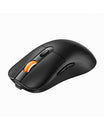
- Press and hold the middle scroll wheel and both left and right buttons simultaneously for 5 seconds until the 2.4G indicator light flashes rapidly.
- Insert the 2.4G USB receiver into your device, and the mouse will automatically connect.
How do I reset the mouse’s Bluetooth connection?
- Turn off the mouse.
- Press and hold the scroll wheel, then turn on the mouse while keeping it pressed. Release the scroll wheel once the Bluetooth channel indicator light starts flashing rapidly.
- Connect the mouse to your device via Bluetooth.
About EM03 NL Charging
How do I charge the device?
- When the battery is low, the charging indicator will flash red until it turns off.
- Insert the Type-C charging cable into the mouse; the indicator light will stay red while charging.
- Charging takes about 1-3.5 hours, and the indicator light will turn green once fully charged.
About EM03 NL DPI Setting
DPI setting instructions
- The default DPI setting is 400. Press the DPI button to adjust the cursor sensitivity.
- The indicator light will flash once for 200 DPI, twice for 400 DPI, three times for 800 DPI, four times for 1200 DPI, and five times for 1600 DPI.
Where can I purchase a replacement USB receiver/adapter if lost?
- This product is compatible with our SM002 receiver, but please note that the USB receiver is currently only shipped within the United States.
- For U.S. customers, please click the link below to purchase: https://www.protoarc.com/products/sm002-usb-receiver
