












FAQ - EM04
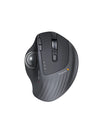
About EM04 Mouse Buttons
Can I reprogram the mouse buttons?
- All keys are not programmable.
- Forward/Backward buttons are not compatible with MAC OS.
How do I adjust the DPI of the mouse?
- About the EM04 mouse, please press the DPI button to adjust the DPI (200-400-800-1200-1600).
- Each press of the button will correspond to a different DPI level, indicated by the number of times the DPI indicator flashes (once for 200, twice for 400, three times for 800, and so on).

About EM04 Trackball
Can the trackball be removed and cleaned?
- The trackball of the EM04 mouse can be removed and cleaned.
- Please refer to the attached screenshot and try to eject the trackball from the backside of the mouse and clean the trackball.
- Please use a humid cloth to clean the trackball, the surface of the inner trackball housing, and the sensor. Then use a cotton swab to clean the dust on three rollers.

What is the size of the trackball?
The diameter of the EM04 wired mouse trackball is 34mm.
